> ## Documentation Index
> Fetch the complete documentation index at: https://portaldocs.peartelco.app/llms.txt
> Use this file to discover all available pages before exploring further.
# Abandoned Follow-up
> Track callers who hung up before being answered and manage callbacks
 ## Overview
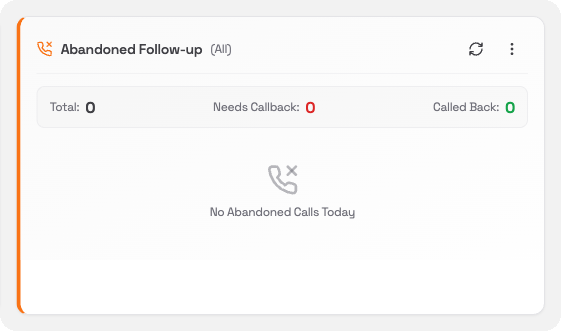
The Abandoned Follow-up card tracks callers who hung up while waiting in a queue before anyone answered. These are people who did not get through. The card helps you make sure they do not get forgotten.
## What you'll see
| Counter | What it means |
| ------------------ | ---------------------------------------------------- |
| **Total** | Total abandoned calls today |
| **Needs Callback** | Abandoned calls that have not been followed up yet |
| **Called Back** | Abandoned calls that have been marked as followed up |
Below the counters, the card lists the most recent abandoned calls (up to 10). Each row shows the caller's number, the time they hung up, and which queue they were in.
When there are no abandoned calls, the card shows **No Abandoned Calls Today**.
## Filtering the list
Click the **⋯** menu in the card header to filter which calls are shown:
* **All Calls**: shows every abandoned call (default)
* **Needs Callback**: shows only calls that have not been followed up
* **Called Back**: shows only calls that have already been handled
Use the **Needs Callback** filter to work through your callback list one by one.
## Refreshing the data
Click the **refresh** icon in the card header to update the abandoned call count and list.
## Overview
The Abandoned Follow-up card tracks callers who hung up while waiting in a queue before anyone answered. These are people who did not get through. The card helps you make sure they do not get forgotten.
## What you'll see
| Counter | What it means |
| ------------------ | ---------------------------------------------------- |
| **Total** | Total abandoned calls today |
| **Needs Callback** | Abandoned calls that have not been followed up yet |
| **Called Back** | Abandoned calls that have been marked as followed up |
Below the counters, the card lists the most recent abandoned calls (up to 10). Each row shows the caller's number, the time they hung up, and which queue they were in.
When there are no abandoned calls, the card shows **No Abandoned Calls Today**.
## Filtering the list
Click the **⋯** menu in the card header to filter which calls are shown:
* **All Calls**: shows every abandoned call (default)
* **Needs Callback**: shows only calls that have not been followed up
* **Called Back**: shows only calls that have already been handled
Use the **Needs Callback** filter to work through your callback list one by one.
## Refreshing the data
Click the **refresh** icon in the card header to update the abandoned call count and list.