> ## Documentation Index
> Fetch the complete documentation index at: https://portaldocs.peartelco.app/llms.txt
> Use this file to discover all available pages before exploring further.
# Recent Calls
> A quick view of the last 10 calls on your system today
 ## Overview
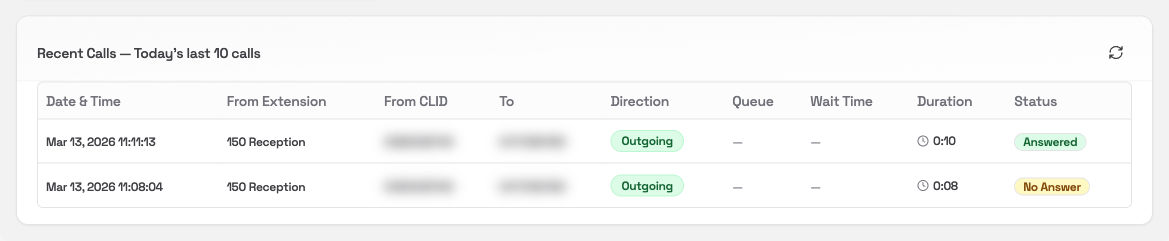
The Recent Calls card shows the last 10 calls on your system today. It is a quick way to check what has come in or gone out recently, without opening the full Call History report.
This card only shows the most recent 10 calls. To search, filter, or export your full call history, go to [Call History](/reporting/call-history).
## What you'll see
Each row in the table is one call:
| Column | What it means |
| ------------------ | -------------------------------------------------------------- |
| **Date & Time** | When the call happened |
| **From Extension** | The internal extension that handled the call |
| **From CLID** | The number the call appeared to come from (for outgoing calls) |
| **To** | The number dialled or the destination |
| **Direction** | Incoming, Outgoing, or Internal |
| **Queue** | The queue the call came through, if any |
| **Wait Time** | How long the caller waited before being answered |
| **Duration** | Total call length |
| **Status** | Whether the call was Answered, No Answer, or Busy |
## Refreshing the data
Click the **refresh** icon in the card header to reload the latest calls.
## Overview
The Recent Calls card shows the last 10 calls on your system today. It is a quick way to check what has come in or gone out recently, without opening the full Call History report.
This card only shows the most recent 10 calls. To search, filter, or export your full call history, go to [Call History](/reporting/call-history).
## What you'll see
Each row in the table is one call:
| Column | What it means |
| ------------------ | -------------------------------------------------------------- |
| **Date & Time** | When the call happened |
| **From Extension** | The internal extension that handled the call |
| **From CLID** | The number the call appeared to come from (for outgoing calls) |
| **To** | The number dialled or the destination |
| **Direction** | Incoming, Outgoing, or Internal |
| **Queue** | The queue the call came through, if any |
| **Wait Time** | How long the caller waited before being answered |
| **Duration** | Total call length |
| **Status** | Whether the call was Answered, No Answer, or Busy |
## Refreshing the data
Click the **refresh** icon in the card header to reload the latest calls.