> ## Documentation Index
> Fetch the complete documentation index at: https://portaldocs.peartelco.app/llms.txt
> Use this file to discover all available pages before exploring further.
# Total Calls
> Today's call volume broken down by incoming, outgoing, and internal
 ## Overview
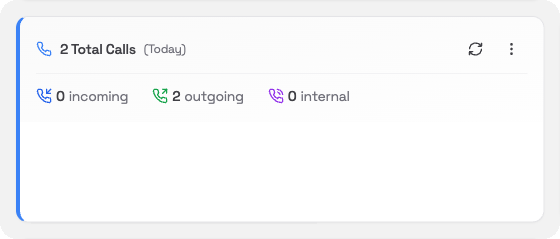
The Total Calls card shows a quick count of all calls handled by your phone system for the time period you choose. It splits them into three groups.
## What you'll see
| Category | What it includes |
| ------------ | ------------------------------------------------- |
| **Incoming** | Calls that came in from outside your organisation |
| **Outgoing** | Calls made by your extensions to external numbers |
| **Internal** | Calls between extensions within your system |
The large number at the top shows the combined total for the selected period.
## Changing the time period
Click the **⋯** menu in the card header to change the period:
* **Today**: calls so far today (default)
* **Yesterday**: the full previous day
* **This Week**: Monday to today
* **Last Week**: the full previous week
The period label in the card header updates to show what you have selected.
## Refreshing the data
Click the **refresh** icon in the card header to update the counts.
## Overview
The Total Calls card shows a quick count of all calls handled by your phone system for the time period you choose. It splits them into three groups.
## What you'll see
| Category | What it includes |
| ------------ | ------------------------------------------------- |
| **Incoming** | Calls that came in from outside your organisation |
| **Outgoing** | Calls made by your extensions to external numbers |
| **Internal** | Calls between extensions within your system |
The large number at the top shows the combined total for the selected period.
## Changing the time period
Click the **⋯** menu in the card header to change the period:
* **Today**: calls so far today (default)
* **Yesterday**: the full previous day
* **This Week**: Monday to today
* **Last Week**: the full previous week
The period label in the card header updates to show what you have selected.
## Refreshing the data
Click the **refresh** icon in the card header to update the counts.