

Overview
With Pear X-Fax and the email-to-fax option enabled for your practice, you can fax anyone from inside Best Practice without opening the portal at all. You send it exactly as you would send an email. If your practice software can send an email, it can send a fax. That applies to Best Practice, and to any other practice management system with an email window: the fax number goes where the email address normally goes.Email-to-fax is set up by Pear. If the steps below do not work, or you are not sure whether your practice has it, log a case using the Support link in the left menu of the portal.
Your practice’s fax domain
Every practice has its own fax email domain, in the formyourpractice.pear.net.au. Pear gives you yours when email-to-fax is set up. The part before .pear.net.au is unique to your practice.
If you do not know your practice’s fax domain, log a case using the Support link in the left menu of the portal and we will confirm it.
Sending a fax from Best Practice
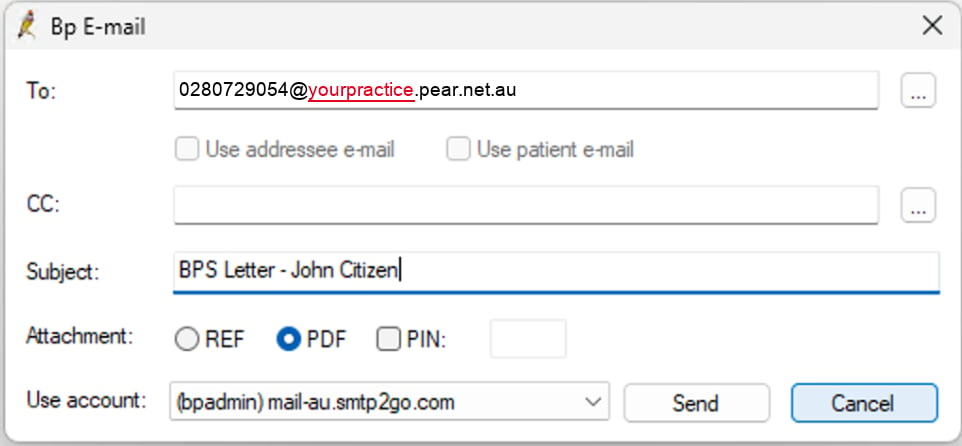
Example only. Replace yourpractice with your own practice's fax domain.
- To: enter the fax number, then
@, then your practice’s own fax domain. For example, if your domain isyourpractice.pear.net.au, you would enter0280729054@yourpractice.pear.net.au. The number must be the full 10 digits including the area code, with no spaces, brackets or dashes. - CC: leave blank, or add another fax number the same way to send the same document to a second recipient.
- Subject: type something that identifies the document, for example “BPS Letter, John Citizen”. This becomes the fax subject and is what you will see in the Fax Mailbox.
- Attachment: choose PDF. A fax cannot be sent as REF.
- PIN: leave this unticked. A PIN-protected attachment cannot be opened at the other end.
- Use account: this is usually your default account. If you are not sure which to use, check with your practice’s Best Practice administrator.
- Click Send.
Before it will work
Two things have to be right, and both are worth checking once rather than wondering later. The sending address must be an authorised sender. The email address behind the account in Use account has to be on your practice’s Authorised Senders list in the portal, either as that exact address or as your whole practice domain. If it is not, the fax is rejected. See Authorised Senders for how to add it. The fax number must be 10 digits. Australian fax numbers are area code plus eight digits, for example0280729054. Leave out the +61, and do not use spaces or punctuation.
What happens next
The fax appears in your Fax Mailbox in the portal:- First in the outgoing queue, while it is being sent
- Then on the Sent tab once it has gone through